Book in supplier deliveries against your Linnworks purchase orders — on the scanner, as the pallet comes off.
Your goods-in team picks the Linnworks purchase order, scans each item as it comes off the pallet, and the app counts it against the right line. When the delivery is checked, one tap books it into Linnworks.
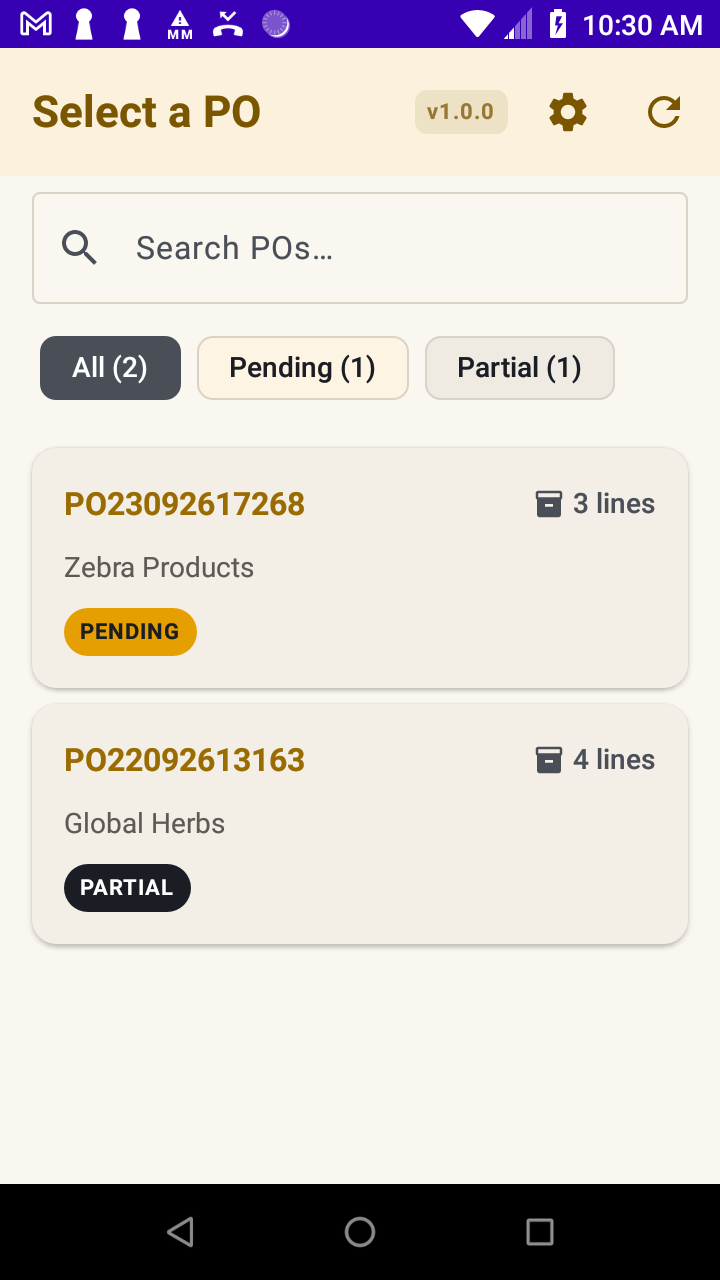
Pending, open and part-delivered orders come straight from Linnworks, with search so a long list isn’t a problem.
Each scan counts a unit against the correct line. A running total and a progress bar show how much of the order is in.
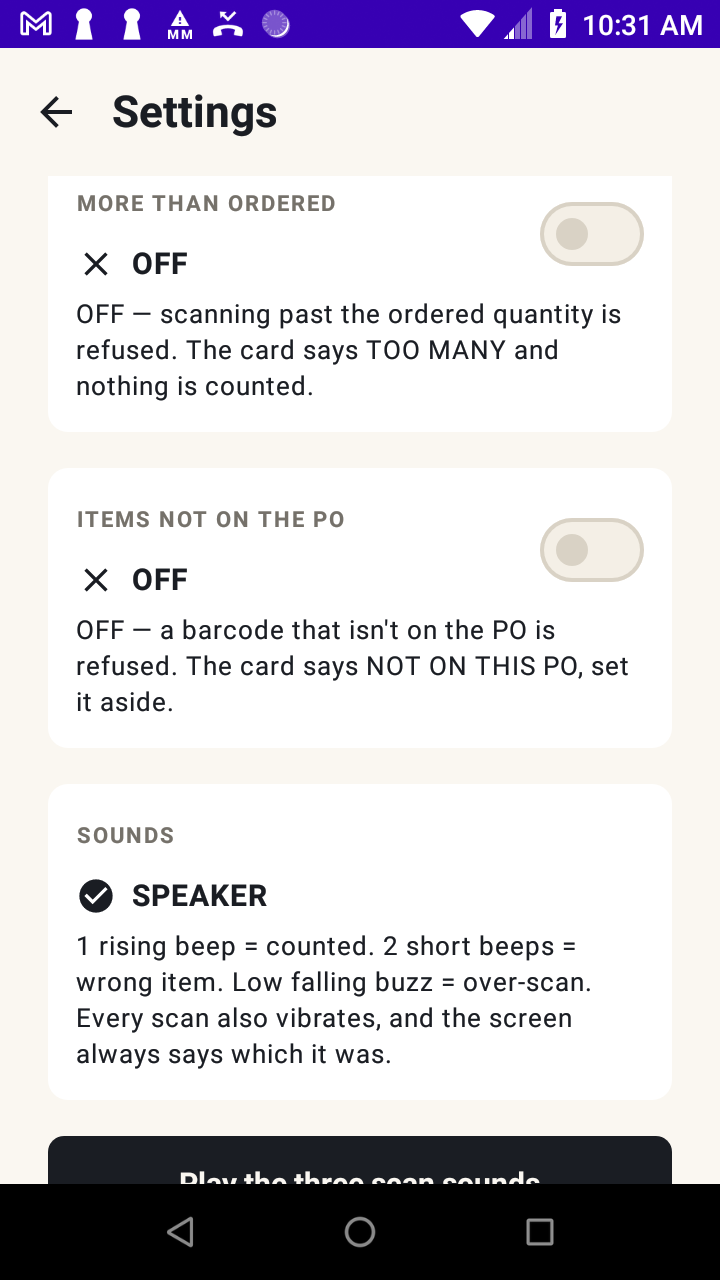
An item that isn’t on the order, or a unit beyond the quantity ordered, is refused and nothing is counted. You choose whether to relax that.
If the scanner dies or the app closes, your counts are still there when it reopens. Scanning carries on with no Wi-Fi — sending waits until it’s back.
Send what actually turned up. The order stays open for the rest, ready for the next lorry.
Damaged or missing barcode? Key the code in by hand and carry on. It counts exactly the same way.
Whoever is on goods-in gets the same clear answer every time — as a word, an icon, a sound and a vibration.
On the order, within the quantity ordered. The total goes up by one.
This item isn’t on the order at all. Nothing is counted. Put it to one side and query it.
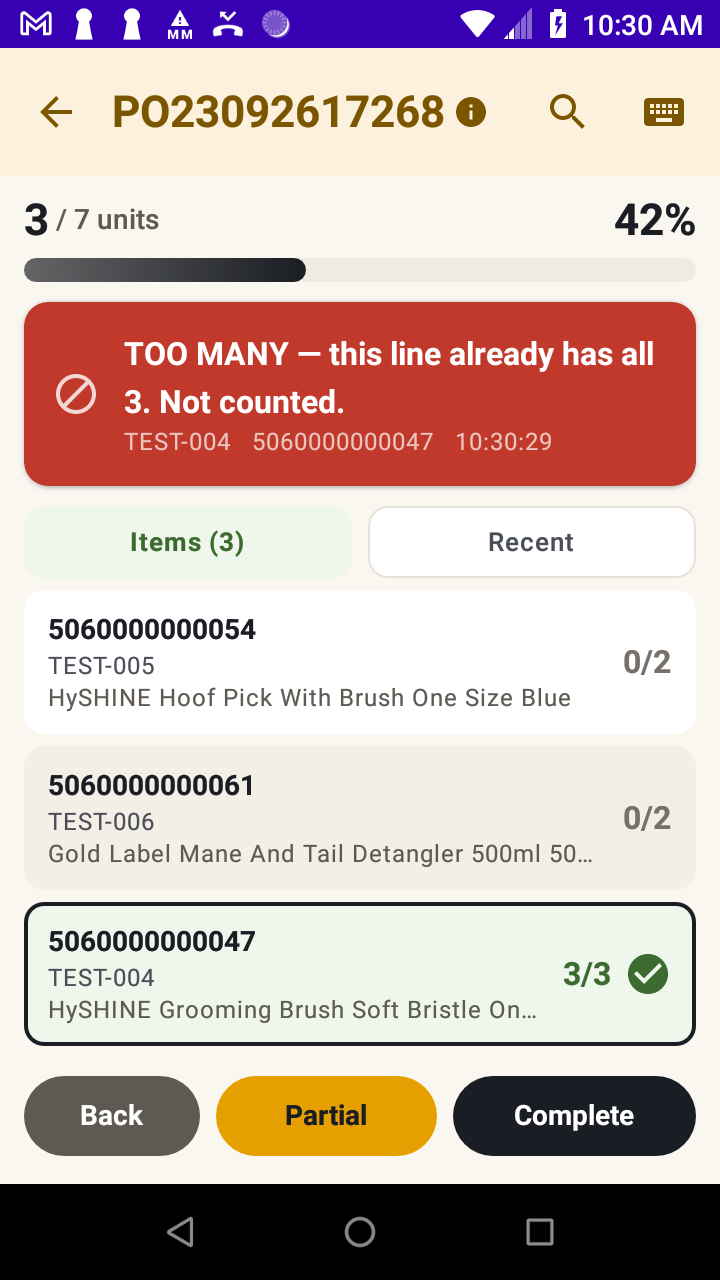
The line is already fully counted. Nothing is counted. The supplier has over-shipped.
Every line on the order is fully counted. Ready to send to Linnworks.
Each answer has its own word and its own icon shape. The app never uses colour on its own to tell your team what happened, so it reads the same way for colour-blind staff — and across a dim warehouse at arm’s length.
Pick the order → count → wrong item refused → one too many refused → part delivery → complete → delivery booked. 1 min 49 s, no sound.

Open Linnworks purchase orders, with search
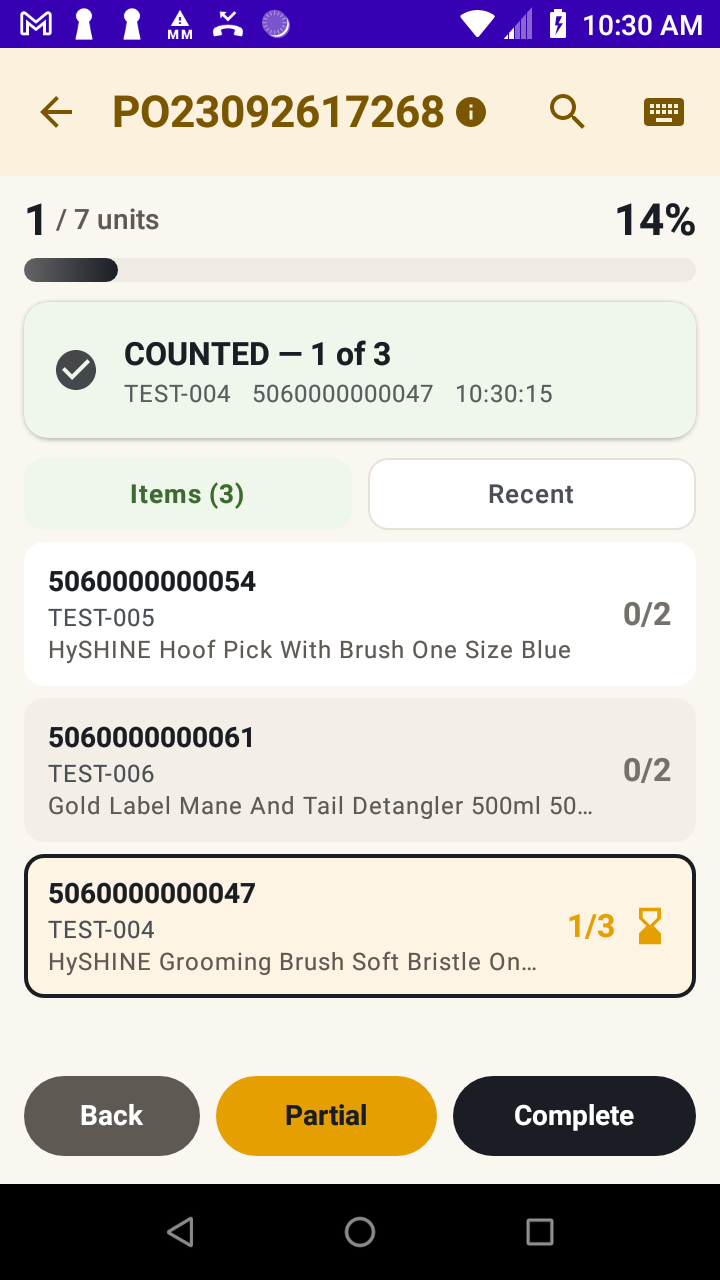
Running total and progress against each line
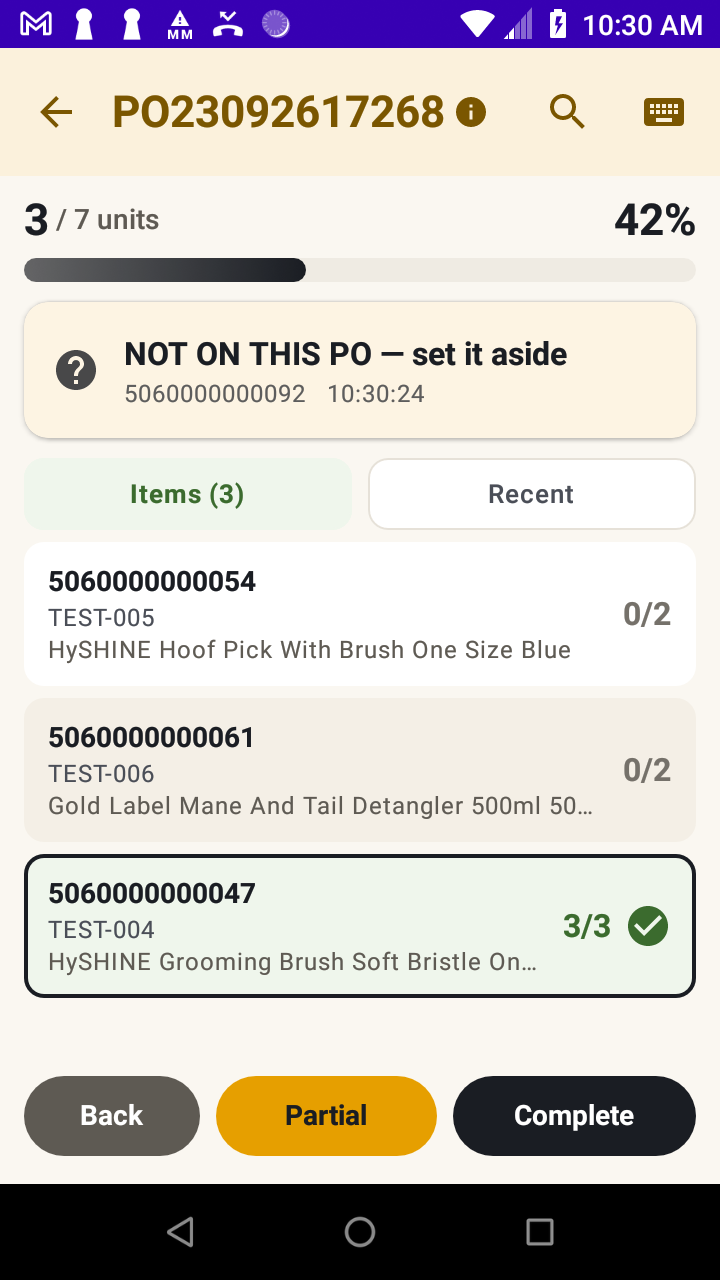
Not on this PO — nothing counted

The line is already full — nothing counted
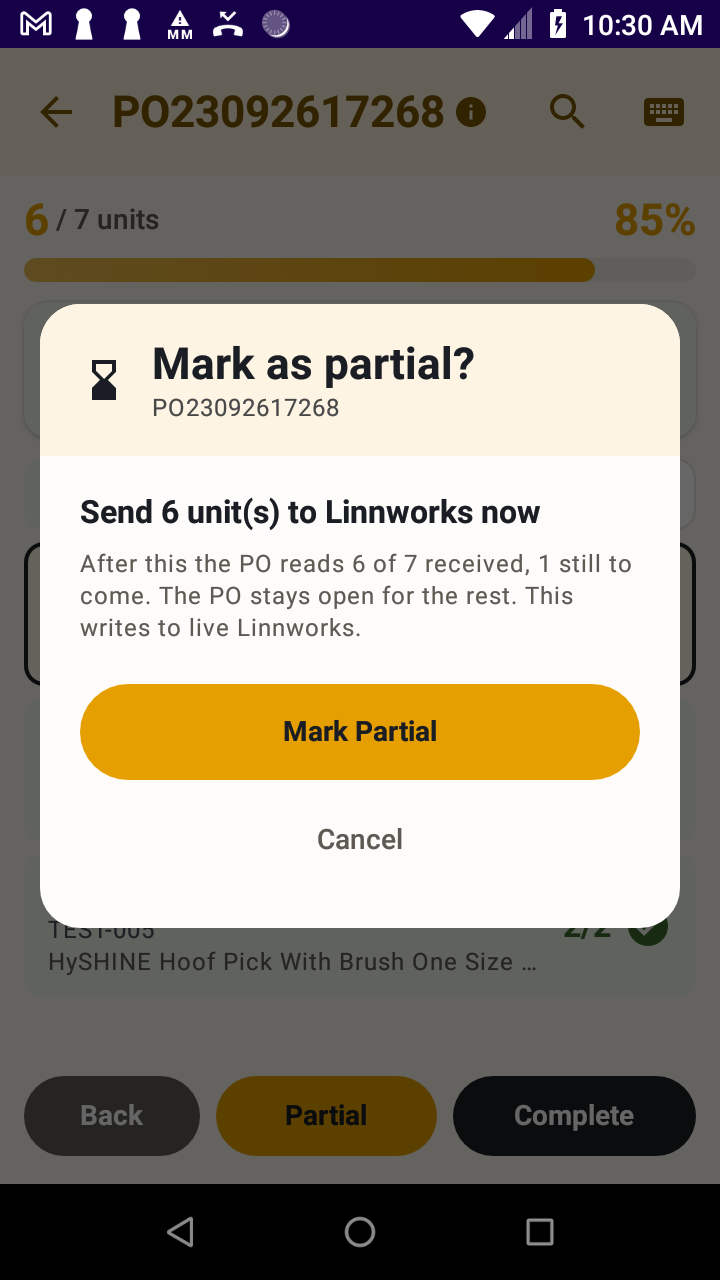
“Send 6 units now… after this the PO reads 6 of 7”
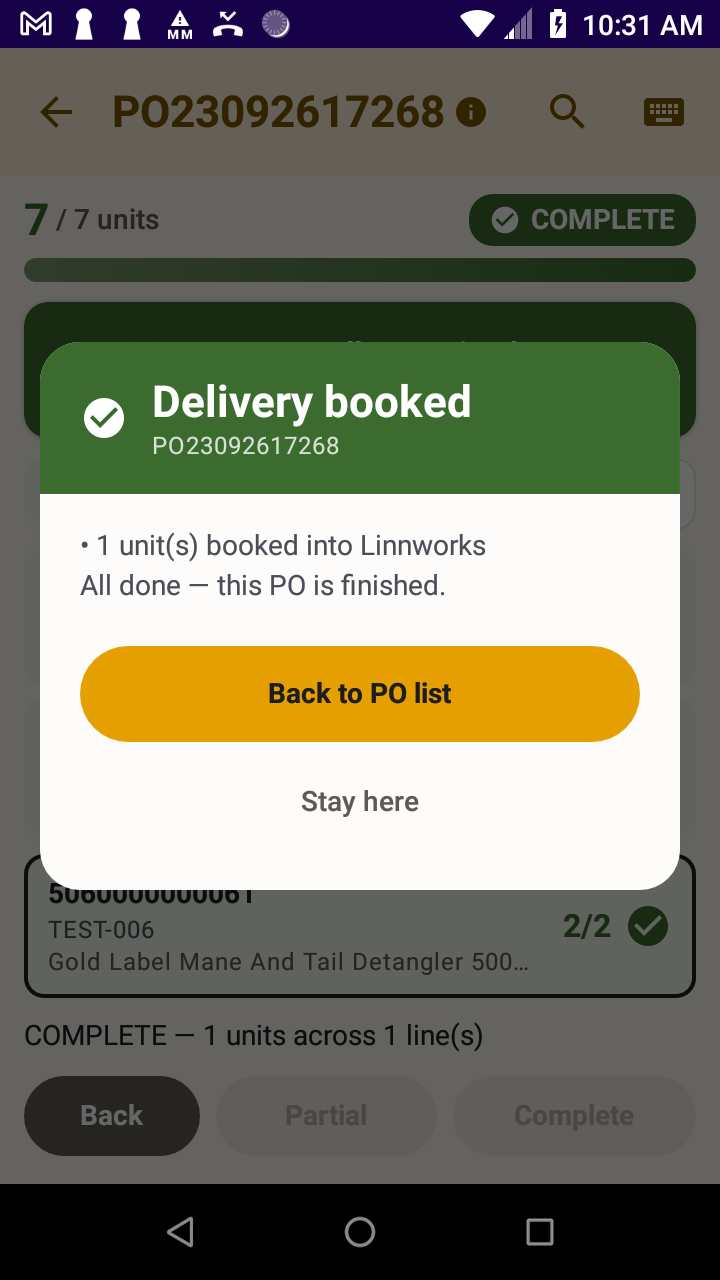
Written into Linnworks, once

Two switches for warehouses that work differently
Out of the box, Goods In refuses anything that doesn’t match the order. Some warehouses would rather take the stock and fix the paperwork. Both settings live in Settings, and both are off until you turn them on.
Counts the extras, and raises the ordered quantity on the purchase order in Linnworks to match what actually arrived.
Finds the item in Linnworks and adds it to the order, instead of turning it away.
Goods In re-reads the order before sending. If someone changed it in Linnworks while you were counting, it merges the change and warns you. And if the signal drops halfway through a send, it checks what already reached Linnworks before sending again — so a delivery is never booked twice.
We run our own UK e-commerce warehouse on Linnworks. Goods In was built for our own bench, by the people who have to use it when a lorry turns up at four o’clock.
Add Goods In to your Linnworks account from the Linnworks Application Store and start the 14-day free trial.
Install the app from Google Play onto your Zebra scanner. Managing a fleet? Your IT team can push it to every device.
Create your account in the app using the same email address as your Linnworks login, and confirm it. That’s what tells the app which Linnworks account you belong to — it connects itself from there. No tokens to copy, nothing to paste.
The £12 covers your Linnworks account. Put it on one scanner or fifteen, with as many staff as you like — the price doesn’t move. Cancel in Linnworks whenever you want; it stops at the end of the month you’ve paid for.
The full terms are on the Goods In terms page.
Yes. Goods In reads your purchase orders from Linnworks and books deliveries back into it. It is built specifically for retailers who run their stock and purchase orders in Linnworks, and it does nothing without a Linnworks account.
Zebra Android scanners, running Android 8 or later. It uses Zebra’s DataWedge scanning service and sets up its own scanner profile, so there is nothing for you to configure. We do not support camera scanning or scanners from other manufacturers — please check your devices during the free trial.
You carry on scanning. The counts are held on the device and sent when the connection comes back. If a send is cut off halfway, the app checks what already reached Linnworks before it sends anything again, so the delivery cannot be booked twice.
The delivery you were part-way through is still there when you open the app again, with the counts you had already made. Nothing is lost.
Send what arrived. The purchase order stays open in Linnworks for the balance, and you book the rest in when it comes.
Goods In re-reads the order immediately before it writes. If it has changed, the app merges the change and warns you rather than silently overwriting someone’s work.
Not unless you ask for it. By default both an unexpected item and an over-count are refused, and nothing is counted. Two settings change that if your warehouse would rather take the stock and correct the order — see “If your warehouse works differently” above. Both are off until you switch them on.
The scanner never holds the app secret or your Linnworks account’s permanent token — those stay on our server. Your purchase orders, items and counts pass between the scanner and your own Linnworks account and are never stored on our servers. Our privacy policy (section 2B) sets out exactly what we do hold.
£12 a month plus VAT for your whole Linnworks account, after a 14-day free trial. It’s billed through the Linnworks Application Store alongside the rest of your Linnworks subscription, so there’s no separate invoice from us and we never see your card details.
We do — email support@englander.ai and a real person who works on the app will reply. There is no ticket maze.
Pick the order, scan the pallet, book it in — and know that a wrong item was caught at the bench rather than three weeks later in a stock check.
Download on Google Play